
本文最后更新于 50 天前,其中的信息可能已经有所发展或是发生改变。
前言
每个搭博客的人都想把自己的博客搭建的美美的,我也不例外,以下是我自己的博客使用修改的美化方案,希望对你有帮助。
注:本文仅代表个人使用以及修改,素材来自互联网并无商业用途,如有侵权请联系Tom100098@163.com
3.16更新arong主题左侧栏隐藏搜索框,详情看文章目录
外观设置-主题编辑器-footer.php文件修改
文章卡片3D效果,添加在末尾</body>上方
<!--鼠标悬停3D效果start-->
<!--1.定义对象属性(似乎没生效)-->
<div class="article.post:not(.post-full)" data-tilt></div>
<div class=".shuoshuo-preview-container" data-tilt></div>
<!--2.JS脚本-->
<!--script src="https://cdn.jsdelivr.net/gh/huangwb8/bloghelper@latest/js/mobile-detect.js"></script--> <!--如果你没有引用过mobile-detect.js,请去除这里的注释以使其生效-->
<script type="text/javascript" src="https://cdn.jsdelivr.net/gh/huangwb8/bloghelper@latest/vanilla3D/vanilla-tilt.js"></script>
<!--3.动作-->
<script type="text/javascript">
    // 设备检测。依赖前述mobile-detect项目。
    var md = new MobileDetect(window.navigator.userAgent);

    // PC生效,手机/平板不生效
    // md.mobile(); md.phone();
    if(!md.phone() && !md.tablet()){
        window.pjaxLoaded = function(){
            // 正文卡片
            VanillaTilt.init(document.querySelectorAll("article.post:not(.post-full)"),{
                reverse:false,  // 是否反转倾斜方向
                max:2,     // 最大的倾斜角度(度)
                startX:0,      // X轴上的起始倾斜,单位为度。
                startY:0,      // Y轴上的起始倾斜,单位为度。
                perspective:1000,   // 转换角度,越低倾斜越极端
                scale:1.02,      // 缩放比例,2 = 200%, 1.5 = 150%, 等等..
                speed:300,    // 进入/退出 过渡的速度
                transition:true,   // 是否在进入/退出的时候设置过渡效果
                axis:"y",   // 设置禁用哪个轴的反转,值为"x"或者"y"或者null
                reset:true,   // 设置在退出时清除倾斜效果
                easing:"cubic-bezier(.03,.98,.52,.99)",    // 设置进入退出时过渡的贝塞尔曲线
                glare:true,// 设置是否拥有炫光效果,即透明度渐变效果
                "max-glare":0.7,      // 设置最大的透明效果,1=100%,0.5=50%
                "glare-prerender":false,  // false, VanillaTilt为你创建透明炫光元素,否则你需要自己在.jstilt-glare>.js-tilt-glare-inner中自己添加render函数
                "mouse-event-element":null,   // css选择器或者链接到HTML的元素,他将监听该元素上的鼠标事件
                "full-page-listening":false,  // 是否监听整个页面的鼠标移动事件,若为true,他将监听这个页面,而非选中元素
                gyroscope:false,   // 是否开启陀螺仪的方向检测
                gyroscopeMinAngleX: 0,  //陀螺仪最小角度X
                gyroscopeMaxAngleX: 0,  //陀螺仪最大角度X
                gyroscopeMinAngleY: 0,  //陀螺仪最小角度
                gyroscopeMaxAngleY: 0,  //陀螺仪最大角度
                gyroscopeSamples: 10  //陀螺仪样品
            })

            // 说说卡片
            VanillaTilt.init(document.querySelectorAll(".shuoshuo-preview-container"),{
                reverse:false,  // 是否反转倾斜方向
                max:2,     // 最大的倾斜角度(度)
                startX:0,      // X轴上的起始倾斜,单位为度。
                startY:0,      // Y轴上的起始倾斜,单位为度。
                perspective:1000,   // 转换角度,越低倾斜越极端
                scale:1.02,      // 缩放比例,2 = 200%, 1.5 = 150%, 等等..
                speed:300,    // 进入/退出 过渡的速度
                transition:true,   // 是否在进入/退出的时候设置过渡效果
                axis:"y",   // 设置禁用哪个轴的反转,值为"x"或者"y"或者null
                reset:true,   // 设置在退出时清除倾斜效果
                easing:"cubic-bezier(.03,.98,.52,.99)",    // 设置进入退出时过渡的贝塞尔曲线
                glare:true,// 设置是否拥有炫光效果,即透明度渐变效果
                "max-glare":0.7,      // 设置最大的透明效果,1=100%,0.5=50%
                "glare-prerender":false,  // false, VanillaTilt为你创建透明炫光元素,否则你需要自己在.jstilt-glare>.js-tilt-glare-inner中自己添加render函数
                "mouse-event-element":null,   // css选择器或者链接到HTML的元素,他将监听该元素上的鼠标事件
                "full-page-listening":false,  // 是否监听整个页面的鼠标移动事件,若为true,他将监听这个页面,而非选中元素
                gyroscope:false,   // 是否开启陀螺仪的方向检测
                gyroscopeMinAngleX: 0,  //陀螺仪最小角度X
                gyroscopeMaxAngleX: 0,  //陀螺仪最大角度X
                gyroscopeMinAngleY: 0,  //陀螺仪最小角度
                gyroscopeMaxAngleY: 0,  //陀螺仪最大角度
                gyroscopeSamples: 10  //陀螺仪样品
            })
        }
        $(window.pjaxLoaded);
        $(document).on('pjax:end', window.pjaxLoaded);
    }
</script>
<!--鼠标悬停3D效果end-->
文字输入撒花特效
添加在末尾</body>上方
<script src="https://cdn.jsdelivr.net/gh/huangwb8/bloghelper@latest/js/input-with-fire.js"></script>鼠标移动特效
添加在末尾</body>上方
<!--全页特效开始-->
<script src="https://cdn.jsdelivr.net/gh/huangwb8/bloghelper@latest/js/mobile-detect.js"></script>
<script type="text/javascript">
    // 设备检测
    var md = new MobileDetect(window.navigator.userAgent);

    // PC生效,手机/平板不生效
    // md.mobile(); md.phone();
    if(!md.phone()){
        if(!md.tablet()){
            // 雪花
            //$.getScript("https://cdn.jsdelivr.net/gh/huangwb8/bloghelper@latest/js/xiaxue.js");

            // 樱花
            // $.getScript("https://cdn.jsdelivr.net/gh/huangwb8/bloghelper@latest/js/yinghua.js");

            // 小烟花特效
            // $.getScript("https://cdn.jsdelivr.net/gh/huangwb8/bloghelper@latest/js/mouse-click.js");

            // 大烟花特效
            //$.getScript("https://cdn.jsdelivr.net/gh/huangwb8/bloghelper@latest/mouse/mouse-click-02/mouse-canvas.js");
            //document.write('<style>#mouse-canvas {z-index:217483647; pointer-events: none;  box-sizing: border-box !important; display: block !important; position: fixed !important; left: 0; right: 0; top: 0; bottom: 0; width: 100%; height: 100vh;}</style>')

            // 鼠标移动的仙女棒特效
            $.getScript("https://cdn.jsdelivr.net/gh/huangwb8/bloghelper@latest/mouse/halo-dream/fairyDustCursor.min.js");

            // 鼠标移动的泡泡特效
            // $.getScript("https://cdn.jsdelivr.net/gh/huangwb8/bloghelper@latest/mouse/joe/censor10.js");
        }
    }
</script>
<!--全页特效结束-->
注:需要使用哪个特效就把前面的//删掉即可,我使用的是仙女棒特效
背景图滚动虚化特效
添加在末尾</body>上方
<!--滚动模糊-->
<script>
window.addEventListener("scroll", function (e) {
  if (window.scrollY > window.innerHeight * 0.3) {
    document.querySelector("#content").classList.add("scrolled");
  } else {
    document.querySelector("#content").classList.remove("scrolled");
  }
});</script>
<style>
#content.scrolled::before, #content.scrolled::after {
  filter: blur(6px); /*数字越大虚化越明显*/
  transform: scale(1.02); /*数字越大背景放大越明显*/
}
#content::before, #content::after {
  transition: filter .3s ease, transform .3s ease !important;
  filter: blur(0px);
  transform: scale(1.02);
}
</style>
点击头像跳转页面
在 外观 — 主题文件编辑器 中,选择 边栏文件(sidebar.php)
点击 头像 跳转大概在第 126 行左右,
添加 <a> 标签,即 <a href="https://tomhi.cn/?paeg_id=136">, 其中链接改为想要跳转的地方
<div class="tab-pane fade text-center<?php if ($nowActiveTab == 1) { echo ' active show'; }?>" id="leftbar_tab_overview" role="tabpanel" aria-labelledby="leftbar_tab_overview_btn">
<a href="https://tomhi.cn/?page_id=136">
<div id="leftbar_overview_author_image" style="background-image: ........
<a/>
头像缩放或亮暗
鼠标经过头像时自动缩放、高亮 / 暗
在 外观 — 自定义 — 额外CSS 中
#leftbar_overview_author_image {
    width: 100px;
    height: 100px;
    margin: auto;
    background-position: center;
    background-repeat: no-repeat;
    background-size: cover;
    background-color: rgba(127, 127, 127, 0.1);
    overflow: hidden;
    box-shadow: 0 0 5px rgba(116, 8, 204, 0.3);
    transition: transform 0.3s ease; /*变化速度*/
}

#leftbar_overview_author_image:hover {
	transform: scale(1.2); /*缩放大小*/
	filter: brightness(150%); /*调节亮度*/
}
网站底部信息
来源Echlo博客
1.CSS样式表
<style>
/* 核心样式 */
.github-badge {
display: inline-block;
border-radius: 4px;
text-shadow: none;
font-size: 13.1px;
color: #fff;
line-height: 15px;
margin-bottom: 5px;
font-family: "Open Sans", sans-serif;
}
.github-badge .badge-subject {
display: inline-block;
background-color: #4d4d4d;
padding: 4px 4px 4px 6px;
border-top-left-radius: 4px;
border-bottom-left-radius: 4px;
font-family: "Open Sans", sans-serif;
}
.github-badge .badge-value {
display: inline-block;
padding: 4px 6px 4px 4px;
border-top-right-radius: 4px;
border-bottom-right-radius: 4px;
font-family: "Open Sans", sans-serif;
}
.github-badge-big {
display: inline-block;
border-radius: 6px;
text-shadow: none;
font-size: 14.1px;
color: #fff;
line-height: 18px;
margin-bottom: 7px;
}
.github-badge-big .badge-subject {
display: inline-block;
background-color: #4d4d4d;
padding: 4px 4px 4px 6px;
border-top-left-radius: 4px;
border-bottom-left-radius: 4px;
}
.github-badge-big .badge-value {
display: inline-block;
padding: 4px 6px 4px 4px;
border-top-right-radius: 4px;
border-bottom-right-radius: 4px;
}
.bg-orange {
background-color: #ec8a64 !important;
}
.bg-red {
background-color: #cb7574 !important;
}
.bg-apricots {
background-color: #f7c280 !important;
}
.bg-casein {
background-color: #dfe291 !important;
}
.bg-shallots {
background-color: #97c3c6 !important;
}
.bg-ogling {
background-color: #95c7e0 !important;
}
.bg-haze {
background-color: #9aaec7 !important;
}
.bg-mountain-terrier {
background-color: #99a5cd !important;
}
</style>
2.HTML 底部备案信息
   <div class="github-badge-big">
        <span class="badge-subject"><i class="fa fa-id-card"></i> 备案号 </span>
        <span class="badge-value bg-orange">
            <!-- 备案链接 -->
            <a href="https://beian.miit.gov.cn/" target="_blank" one-link-mark="yes">你自己的备案号</a>|
            <a href="https://www.beian.gov.cn/portal/index?token=e547b70c-fbe1-4c80-a4a2-857b17389a71" target="_blank"
                one-link-mark="yes">
                你的公安备案号</a>
        </span>
    </div>


  <div class="github-badge-big">
        <span class="badge-subject"><i class="fa fa-cloud" aria-hidden="true"></i> CDN</span>
        <span class="badge-value bg-shallots">
            <!-- 又拍云链接 -->
            <a href="https://www.upyun.com/" target="_blank" one-link-mark="yes">Upyun</a>
        </span>

        <span class="badge-subject"><i class="fa fa-wordpress"></i> Powered</span>
        <span class="badge-value bg-green">
            <!-- wordpress链接 -->
            <a href="https://cn.wordpress.org/" target="_blank" one-link-mark="yes">
                WordPress</a></span>
    </div>

    <div class="github-badge-big">
        <span class="badge-subject"><i class="fa fa-copyright" aria-hidden="true"></i>Copyright </span>
        <span class="badge-value bg-red">2022-2023</i>
            <a href="https://你的域名/" target="_blank" one-link-mark="yes">@ 你的站点名称
        </span>
        </script>
    </div>

	<!-- 运行时间 -->
    <div class="github-badge-big">
        <span class="badge-subject"><i class="fa fa-clock-o"></i> Running Time</span><span
            class="badge-value bg-apricots"><span id="blog_running_days" class="odometer odometer-auto-theme"></span>
            days
            <span id="blog_running_hours" class="odometer odometer-auto-theme"></span> H
            <span id="blog_running_mins" class="odometer odometer-auto-theme"></span> M
            <span id="blog_running_secs" class="odometer odometer-auto-theme"></span>S
        </span>
3.网站运行时间脚本
<script no-pjax="">
var blog_running_days = document.getElementById("blog_running_days");
var blog_running_hours = document.getElementById("blog_running_hours");
var blog_running_mins = document.getElementById("blog_running_mins");
var blog_running_secs = document.getElementById("blog_running_secs");
function refresh_blog_running_time() {
var time = new Date() - new Date(2022, 5, 31, 0, 0, 0); /*此处日期的月份改为自己真正月份的前一个月*/
var d = parseInt(time / 24 / 60 / 60 / 1000);
var h = parseInt((time % (24 * 60 * 60 * 1000)) / 60 / 60 / 1000);
var m = parseInt((time % (60 * 60 * 1000)) / 60 / 1000);
var s = parseInt((time % (60 * 1000)) / 1000);
blog_running_days.innerHTML = d;
blog_running_hours.innerHTML = h;
blog_running_mins.innerHTML = m;
blog_running_secs.innerHTML = s;
}
refresh_blog_running_time();
if (typeof bottomTimeIntervalHasSet == "undefined") {
var bottomTimeIntervalHasSet = true;
setInterval(function () {
refresh_blog_running_time();
}, 500);
}
</script>
上面三段代码全部添加到argon主题设置的页脚里面即可!
个人使用的额外CSS
在外观-自定义-额外CSS里添加,详情看下图
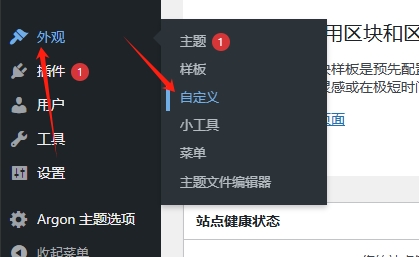
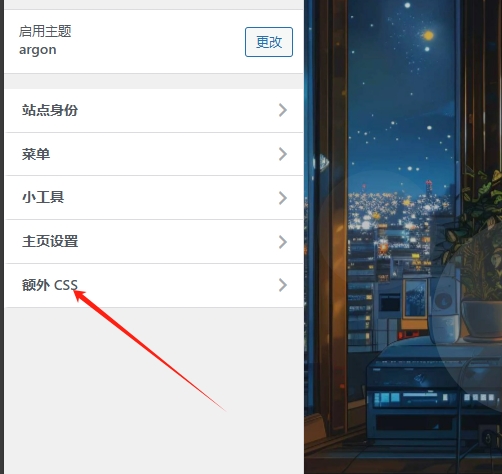
  /*横幅字体大小*/
.banner-title {
  font-size: 2.5em;
}
.banner-subtitle{
  font-size: 28px;

	-webkit-text-fill-color: transparent;
background: linear-gradient(94.75deg,rgb(60, 172, 247) 0%,rgb(131, 101, 253) 43.66%,                rgb(255, 141, 112) 64.23%,rgb(247, 201, 102) 83.76%,rgb(172, 143, 100) 100%);
-webkit-background-clip: text;
}

/*设置加粗字体颜色*/
strong {
    /*白天*/
    color: #A7727D;
}
html.darkmode strong {
    /*夜晚*/
    color: #FAAB78;
}

/*说说预览模式的代码字体颜色*/
pre {
    /*白天*/
    color: #A7727D;
}
html.darkmode pre {
    /*夜晚*/
    color: #FAAB78;
}

/*横幅字体大小*/
.banner-title {
  font-size: 2.5em;
}
.banner-subtitle{
  font-size: 20px;
}

/*文章标题字体大小*/
.post-title {
    font-size: 30px
}

/*正文字体大小(不包含代码)*/
.post-content p{
    font-size: 1.25rem;
}
li{
    font-size: 1.2rem;
}

/*评论区字体大小*/
p {
    font-size: 1.2rem
}

/*评论发送区字体大小*/
.form-control{
    font-size: 1.2rem
}

/*评论勾选项目字体大小*/
.custom-checkbox .custom-control-input~.custom-control-label{
    font-size: 1.2rem
}
/*评论区代码的强调色*/
code {
  color: rgba(var(--themecolor-rgbstr));
}

/*说说字体大小和颜色设置*/
.shuoshuo-title {
    font-size: 25px;
/*  color: rgba(var(--themecolor-rgbstr)); */
}

/*尾注字体大小*/
.additional-content-after-post{
    font-size: 1.2rem
}

/*========颜色设置===========*/

/*文章或页面的正文颜色*/
body{
    color:#364863
}

/*引文属性设置*/
blockquote {
    /*添加弱主题色为背景色*/
    background: rgba(var(--themecolor-rgbstr), 0.1) !important;
    width: 100%
}

/*引文颜色 建议用主题色*/
:root {
    /*也可以用类似于--color-border-on-foreground-deeper: #009688;这样的命令*/
    --color-border-on-foreground-deeper: rgba(var(--themecolor-rgbstr));
}

/*左侧菜单栏突出颜色修改*/
.leftbar-menu-item > a:hover, .leftbar-menu-item.current > a{
    background-color: #f9f9f980;
}

/*站点概览分隔线颜色修改*/
.site-state-item{
    border-left: 1px solid #aaa;
}
.site-friend-links-title {
    border-top: 1px dotted #aaa;
}
#leftbar_tab_tools ul li {
    padding-top: 3px;
    padding-bottom: 3px;
    border-bottom:none;
}
html.darkmode #leftbar_tab_tools ul li {
    border-bottom:none;
}

/*左侧栏搜索框的颜色*/
button#leftbar_search_container {
    background-color: transparent;
}

/*========透明设置===========*/

/*白天卡片背景透明*/
.card{
    background-color:rgba(255, 255, 255, 0.85) !important;
    /*backdrop-filter:blur(6px);*//*毛玻璃效果主要属性*/
    -webkit-backdrop-filter:blur(6px);
}

/*小工具栏背景完全透明*/
/*小工具栏是card的子元素,如果用同一个透明度会叠加变色,故改为完全透明*/
.card .widget,.darkmode .card .widget,#post_content > div > div > div.argon-timeline-card.card.bg-gradient-secondary.archive-timeline-title{
    background-color:#ffffff00 !important;
    backdrop-filter:none;
    -webkit-backdrop-filter:none;
}
.emotion-keyboard,#fabtn_blog_settings_popup{
    background-color:rgba(255, 255, 255, 0.95) !important;
}

/*分类卡片透明*/
.bg-gradient-secondary{
    background:rgba(255, 255, 255, 0.1) !important;
    backdrop-filter: blur(10px);
    -webkit-backdrop-filter:blur(10px);
}

/*夜间透明*/
html.darkmode.bg-white,html.darkmode .card,html.darkmode #footer{
    background:rgba(66, 66, 66, 0.9) !important;
}
html.darkmode #fabtn_blog_settings_popup{
    background:rgba(66, 66, 66, 0.95) !important;
}

/*标签背景
.post-meta-detail-tag {
    background:rgba(255, 255, 255, 0.5)!important;
}*/


/*========排版设置===========*/

/*左侧栏层级置于上层*/
#leftbar_part1 {
    z-index: 1;
}

/*分类卡片文本居中*/
#content > div.page-information-card-container > div > div{
    text-align:center;
}

/*子菜单对齐及样式调整*/
.dropdown-menu .dropdown-item>i{
    width: 10px;
}
.dropdown-menu>a {
    color:var(--themecolor);
}
.dropdown-menu{
    min-width:max-content;
}
.dropdown-menu .dropdown-item {
    padding: .5rem 1.5rem 0.5rem 1rem;
}
.leftbar-menu-subitem{
    min-width:max-content;
}
.leftbar-menu-subitem .leftbar-menu-item>a{
    padding: 0rem 1.5rem 0rem 1rem;
}

/*左侧栏边距修改*/
.tab-content{
    padding:10px 0px 0px 0px !important;
}
.site-author-links{
    padding:0px 0px 0px 10px ;
}
/*目录位置偏移修改*/
#leftbar_catalog{
    margin-left: 0px;
}
/*目录条目边距修改*/
#leftbar_catalog .index-link{
    padding: 4px 4px 4px 4px;
}
/*左侧栏小工具栏字体缩小*/
#leftbar_tab_tools{
    font-size: 14px;
}

/*正文图片边距修改*/
article figure {margin:0;}
/*正文图片居中显示*/
.fancybox-wrapper {
    margin: auto;
}
/*正文表格样式修改*/
article table > tbody > tr > td,
article table > tbody > tr > th,
article table > tfoot > tr > td,
article table > tfoot > tr > th,
article table > thead > tr > td,
article table > thead > tr > th{
    padding: 8px 10px;
    border: 1px solid;
}
/*表格居中样式*/
.wp-block-table.aligncenter{margin:10px auto;}

/*回顶图标放大*/
button#fabtn_back_to_top, button#fabtn_go_to_comment, button#fabtn_toggle_blog_settings_popup, button#fabtn_toggle_sides, button#fabtn_open_sidebar{
    font-size: 1.2rem;
}

/*顶栏菜单放大*/
/*这里也可以设置刚刚我们设置的btfFont字体。试试看!*/

.navbar-nav .nav-link {
    font-size: 1rem;
    font-family: 'echo';

}
.navbar-brand {
	font-family: 'echo';
    font-size: 1.2rem;
    margin-right: 1.0 rem;
    padding-bottom: 0.2 rem;

	-webkit-text-fill-color: transparent;
background: linear-gradient(94.75deg,rgb(60, 172, 247) 0%,rgb(131, 101, 253) 43.66%,                rgb(255, 141, 112) 64.23%,rgb(247, 201, 102) 83.76%,rgb(172, 143, 100) 100%);
-webkit-background-clip: text;
}

/*菜单大小*/
.nav-link-inner--text {
    font-size: 1.25em;
}
.navbar-nav .nav-item {
    margin-right:0;
}
.mr-lg-5, .mx-lg-5 {
    margin-right:1rem !important;
}
.navbar-toggler-icon {
    width: 1.8rem;
    height: 1.8rem;
}
/*菜单间距*/
.navbar-expand-lg .navbar-nav .nav-link {
    padding-right: 1.4em;
    padding-left: 1.4em;
}

/*隐藏wp-SEO插件带来的线条阴影(不一定要装)*/
*[style='position: relative; z-index: 99998;'] {
    display: none;
}

/*头像调大*/
#leftbar_overview_author_image{
  width: 150px !important;
  height: 150px !important;
}
/*设置网站字体*/
/*原则上你可以设置多个字体,然后在不同的部位使用不同的字体*/
@font-face {
    font-family: 'btfFont';
    src: url('https://fastly.jsdelivr.net/gh/huangwb8/bloghelper@latest/fonts/13.woff2') format('woff2'),
         url('https://fastly.jsdelivr.net/gh/huangwb8/bloghelper@latest/fonts/13.woff2') format('woff');
    font-weight: normal;
    font-style: normal;
}
body, p, h1, h2, h3, h4, h5, h6, a, span, div {
    font-family: 'btfFont' !important;
}
#leftbar_overview_author_image {
    width: 100px;
    height: 100px;
    margin: auto;
    background-position: center;
    background-repeat: no-repeat;
    background-size: cover;
    background-color: rgba(127, 127, 127, 0.1);
    overflow: hidden;
    box-shadow: 0 0 5px rgba(116, 8, 204, 0.3);
    transition: transform 0.3s ease; /*变化速度*/
}

#leftbar_overview_author_image:hover {
	transform: scale(1.2); /*缩放大小*/
	filter: brightness(150%); /*调节亮度*/
}
/* 隐藏左侧menu的搜索框 */
.leftbar-search-button {
    display: none;
    padding-top: 0;
    transition: all 0.3s cubic-bezier(0.4, 0, 0, 1);
}
/* 名称 */
#leftbar_overview_author_name {
  	margin-top: 15px;
	font-size: 18px;align-content;
	color:#00FFFF;
}

/* 简介 */
#leftbar_overview_author_description {
    font-size: 14px;
    margin-top: -4px;
    opacity: 0.8;
	color:#c21f30;
}
网站字体可以自己下载上传到云端以免失效
这个代码特效我自己没使用过,来自苯苯大佬
正文自动添加序号
添加位置跟前面的一样,这里就不多说了
<!--正文自动编号-->
<style type="text/css">h1:not(.title){counter-reset:h2counter;counter-increment:h1counter;}h1:not(.title)::before{content:counter(h1counter) " ";}h2{counter-reset:h3counter;counter-increment:h2counter;}h2:not(.comments-title)::before{content:counter(h1counter) "." counter(h2counter) " ";}h3{counter-reset:h4counter;counter-increment:h3counter;}h3::before{content:counter(h1counter) "." counter(h2counter) "." counter(h3counter) " ";}h4{counter-reset:h5counter;counter-increment:h4counter;}h4::before{content:counter(h1counter) "." counter(h2counter) "." counter(h3counter) "." counter(h4counter) " ";}h5{counter-reset:h6counter;counter-increment:h5counter;}h5::before{content:counter(h1counter) "." counter(h2counter) "." counter(h3counter) "." counter(h4counter) "." counter(h5counter) " ";}h6:not(#leftbar_overview_author_name):not(#leftbar_overview_author_description){counter-increment:h6counter;}h6:not(#leftbar_overview_author_name):not(#leftbar_overview_author_description)::before{content:counter(h1counter) "." counter(h2counter) "." counter(h3counter) "." counter(h4counter) "." counter(h5counter) "." counter(h6counter) " ";}body{counter-reset:h1counter;}</style>
3.16Argon主题隐藏左侧栏搜索框
/* 隐藏左侧menu的搜索框 */
.leftbar-search-button {
    display: none;
    padding-top: 0;
    transition: all 0.3s cubic-bezier(0.4, 0, 0, 1);
}
末尾
我自己在使用以及觉得好用的就是这些,最喜欢的是那个卡片3d特效,让网站看起来有活力不少,这些大家都按照自己的喜好来添加吧,还是不要添加过多的特效就是,真的很卡哈哈
